| UPC - This field should contain the UPC number from the barcode on the back of the DVD or VHS movie you are adding. To scan a UPC code using a barcode scanner, you must first place your cursor on this field.
|
Path/Filename (Browse) - If you want to add a movie file from a drive on your computer, this field allows you to browse to that file and select it. The title will automatically be entered in the title field for you. The media type will default to the file's extension. To add a movie from a network drive, you must be on a PC that is on the network but not on the PC where the movie resides. Click on the Browse button and select My Network Places from the lower left panel on the Choose file screen. Select the network path then browse to the movie file. If you are going to be importing the movie information from imdb.com, then the movie file name should match the actual movie title as close as possible to make it easier to find an exact match at imdb.com. If you want your movie file names on your hard drive to include additional information, such as mpaa rating and year, then enclose the additional information in brackets, ex. POPEYES VOYAGE [PG][2004].avi. The title that would be derived from that movie title would be "POPEYES VOYAGE." You do not have to enter a movie file. You can just enter a movie title in the title field. Duplicate file names are not allowed. Duplicate titles with different media types are allowed in the database. |
| Title - If you enter a movie title in the Title field, the media type field is required. If the media type you want is not in the list, you can add it to the Media Types list from the Tools->Options->Miscellaneous screen Duplicate titles with different media types are allowed in the database. |
| UPC - This field should contain the UPC number from the barcode on the back of the DVD or VHS movie you are adding. To scan a UPC code using a barcode scanner, you must first place your cursor on this field.
|
| Media Type - If you enter a filename, the media type will default to the file's extension. You can change it if you wish. Otherwise, enter the media type for the movie you are adding. If you wish to add more than one media type for the movie, you can add multiple media types on the Edit screen. If the media type you want is not in the list, you can add it to the Media Types list from the Tools->Options->Miscellaneous screen |
| Get Movie Info From IMDb.com - If you press the 'Get Movie Info From imdb.com' button, the movie information will be retrieved from www.IMDb.com and the database will be updated with all the movie information. If an exact match on the title is not found, a list of all the closest matched titles to select from is displayed. Beside each title is a link to that title's movie information on IMDb.com so you can preview it before you select it. If you do not see a match you can select "Skip Selection" from the bottom of the screen. Once the title is selected or an exact match on the title was found, the movie information is added to the database and you are taken to the 'Edit' screen. If you enter a UPC number, you have the option of getting the movie information from Amazon.com or IMDb.com. If you choose IMDb, the UPC number will be searched for at Amazon.com. If found, the title will be retrieved. If not found, the UPC number will be searched for at UPCdatabase.com. If found, the title will be retrieved. If a title was retrieved, it is used to search IMDb.com. It is slower to retrieve movie information from IMDb.com than Amazon.com, but most of the time you get more movie information. The time it takes to retrieve the movie information will vary, but has little to do with the speed of your internet connection. All processing is done at the server. |
Get Movie Info From Amazon.com - If you enter a UPC number, you have the option of getting the movie information from Amazon.com or IMDb.com. It is faster to retrieve movie information from Amazon.com than IMDb.com, but most of the time you don't get as much movie information. If you choose Amazon and the UPC number is on file there, your movie database will be updated with the DVD or VHS movie information from Amazon. Be sure you select the correct media type because it is used as part of the search key at Amazon. If the UPC number is not on file at Amazon, then the UPC number is searched for at UPCdatabase.com. If found, the title is retrieved and used to search IMDb.com. If an exact match on the title is not found, a list of all the closest matched titles to select from is displayed. Beside each title is a link to that title's movie information on IMDb.com so you can preview it before you select it. If you do not see a match you can select "Skip Selection" from the bottom of the screen. Once the title is selected or an exact match on the title was found, the movie information is added to the database and you are taken to the 'Edit' screen. |
| Enter Movie Info Manually - If you don't wish to retrieve any movie information, then you can select 'Enter Movie Info Manually.' If you entered a UPC number, the UPC number will be searched for at Amazon.com. If found, the title and ASIN number will be returned. If not found, the UPC number will be searched for at UPCdatabase.com. If found, the title will be returned. The title, which was either retrieved from entering a UPC number, entered in the Title field or derived from the Filename, will be added to the database along with the media type and possible UPC number and ASIN number. The Edit screen will then be displayed so you can enter the rest of the data. |
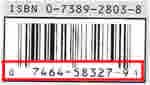 The UPC number is located below the barcode. The UPC code for this example is 074645832791.